The next synthesizer for my pulse sound programming demo is my Behringer Neutron, a semi-modular analog synthesizer original to Behringer. It has signal paths hardwired internally but they can be interrupted, rerouted, and supplemented using the physical patch bay. It has no keyboard, so I’ve provided MIDI input.
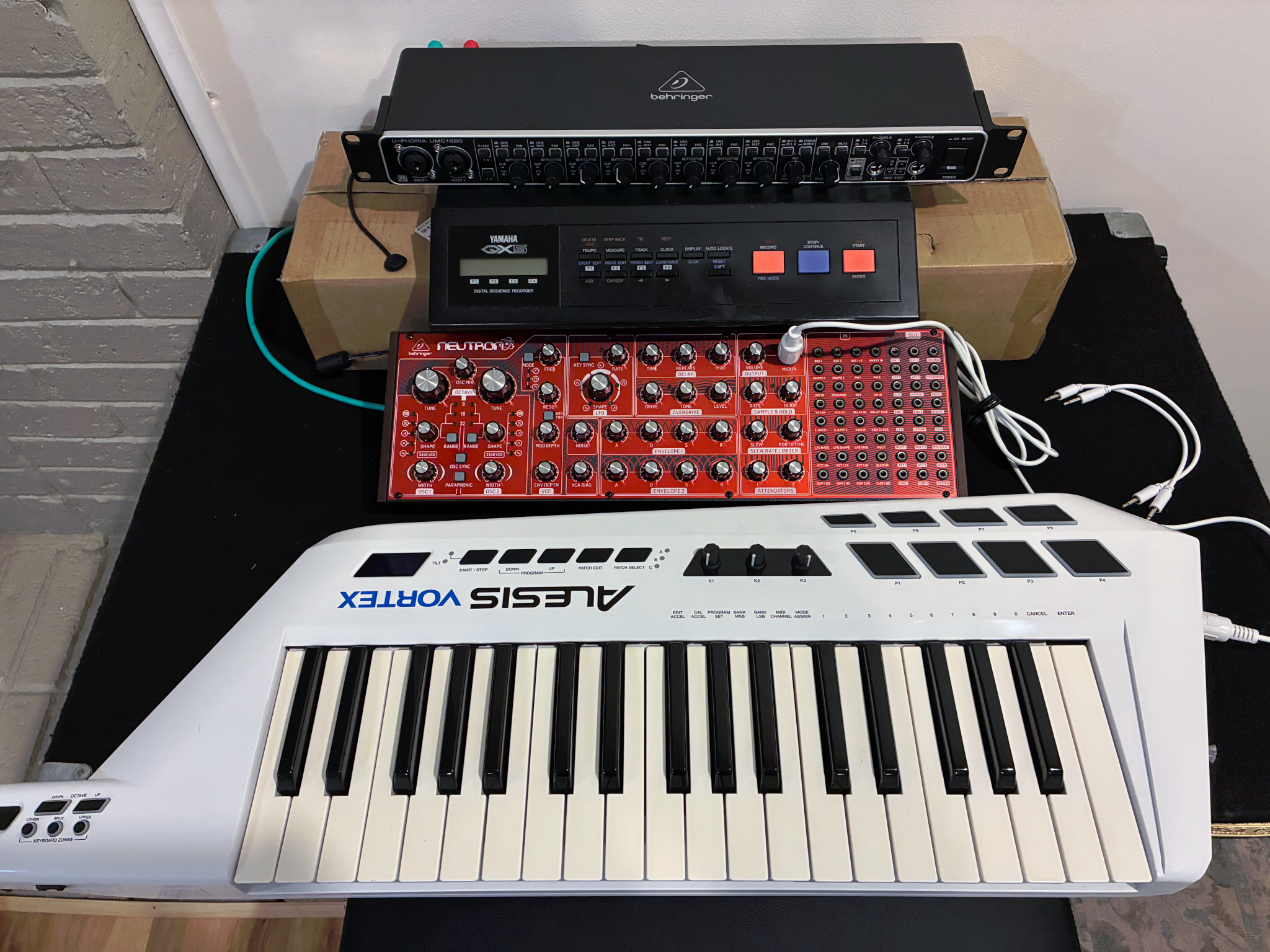
Features:
- Monophonic — plays only one note at a time — or paraphonic (can split the two oscillators to separate notes)
- Monaural — one-channel audio output
- 2 voltage-controlled oscillators (VCOs) — sine, triangle, sawtooth, square, or PWM — pitch is controlled by voltage and I don’t find it particularly stable
- patch bay that can patch almost any signal to the control input of almost any other signal
- 1 low-frequency oscillator (LFO) — sine, triangle, sawtooth, square — that’s hardwired to modulate VCF (and maybe more things I’m overlooking) and can be patched to modulate anything
- 2 ADSR envelope generators that are hardwired to modulate amplitude and VCF and can be patched to modulate anything
- Velocity received; can be configured to control VCF and can be patched to modulate anything
- Numerous other features that I won’t use and one that I’ll describe when I do
Let’s get programming.
Make it Make Sound
Like the JX-8P, the Neutron has fewer controls than the Odyssey that mysteriously make it not make any sound, but for a good start:
- VCF Frequency to maximum (otherwise you’re low-pass filtering with a very low cutoff)
- Output Volume to mid (whether you’re using line out or headphones), because that’s the master gain
- Overdrive Tone to center and Level to mid, because that’s the other master gain
- Not necessary for making sound, but start with OverDrive Drive at minimum (because it’s a really aggressive preamplifier)
- Envelope 1 ADSR to about 9:00 – 2:00 – 9:00 – 2:00
Oscillators
In the Oscillator section, turn the Oscillator Mix all the way CCW to hear just OSC1. On the Neutron, the square wave seems a bit too dull, so set OSC1 Shape to sawtooth.
Start by setting its Range to 8 for tuning.
Pressing a key should now play a note. If you’re using headphones, plug them in and carefully dial up the headphone volume. If you’re using a mixer, press a key and dial up the input trim until you’re peaking a little below 0 dB, or dial up until input clipping lights and back down until it doesn’t.
Now tune the synthesizer. Like the Odyssey, it doesn’t have set pitch. And worse than the Odyssey, I don’t find that it holds pitch well at all — I seem to need to retune every 30-60 minutes — but it also doesn’t help that the Tune potentiometers have no resistance whatsoever and are the largest and easiest-to-bump knobs on the whole console.
Play a reference pitch, press that key, and turn OSC1 Tune to tune to that pitch.
Finally (for OSC1 initial configuration), set the Range to 32 for the beginning of a rich dual-oscillator sound. Here’s the resulting audio of the base configuration of OSC1:
To add the second oscillator, set Oscillator Mix to about the middle, OSC2 Shape to sawtooth also, OSC2 Range to 16; and then OSC2 Tune to tune it first to match the pitch of OSC1 (an octave higher) and then to slightly detune it down.
The shimmer from the detuning is enough movement for my taste, so I won’t use LFO to modulate pitch.
Filtering
The Neutron’s sawtooth doesn’t seem as brassy as some of the other synthesizers, but I still want to dull it a bit. Dial back the VCF Frequency until satisfied, then bring up VCF Envelope until a little bit of punchy attack is restored. VCF Envelope uses Envelope 2, which I’ve set to minimum, 9:00, minimum, minimum.
In my case, both the VCF Frequency and the VCF Envelope ended up around the 1:00 positions.
Envelope
Adjust the attack and decay to make softer “wuh” pulses, in my case with attack to about 1:20 and decay still at 2:00:
Softening the attack as much as possible for eighth-note pulsing
Crescendo the Pulses Only
The reason for this entire series is that I want to fade in a long note and then have pulses barely audible above that note with the pulses increasing in volume until they dominate and break to eighth notes.
Like the Odyssey, the Neutron has a VCA Bias control that brings up the minimum amplitude, with the attack-decay envelope added on top:
VCA Bias sets minimum amplitude
But with no other changes, the pulses are a fixed amplitude above that, not controlled for fading in. And here’s where the modular synth really shines.
Internally, Envelope 1 is generating control voltages to feed to the Voltage-Controlled Amplifier to set the amplitude at different moments in the lifespan of a single note. (And VCA Bias sets a base voltage that keeps the note playing forever.)
The modular synth allows us to break the chain between Envelope 1 and the VCA and route the envelope’s output control voltage to a variable attenuator before sending the sum of VCA Bias and (attenuated) Envelope 1 to the VCA. That finally lets us directly set the amount that the pulses peak above the drone.
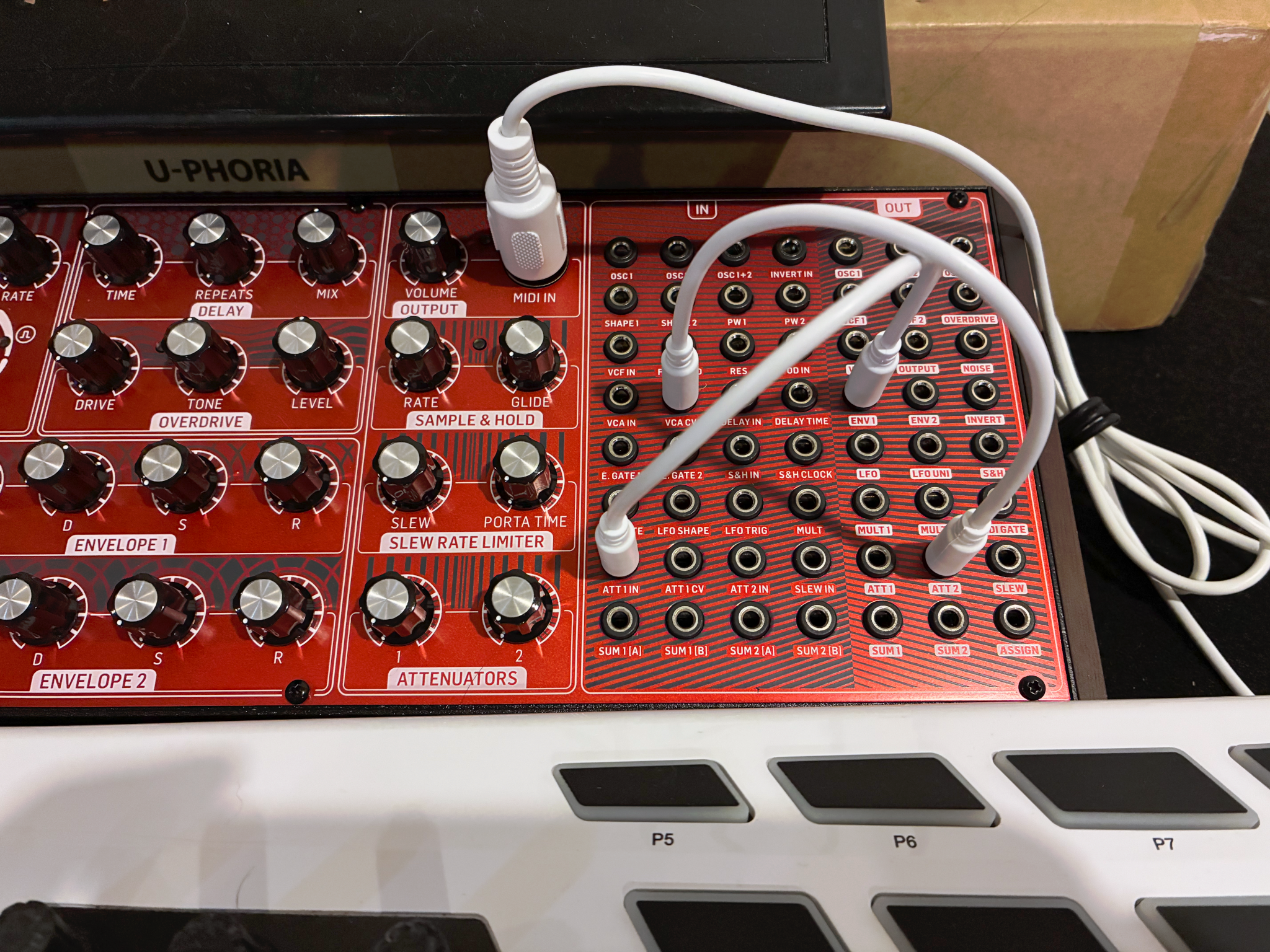
To prepare the attenuated envelope:
- Turn Envelope 1 Sustain to minimum, because we only need to provide the pulses and not any ongoing amplitude.
- On the right, patch Envelope 1 Out to Attenuator 1 In, to prepare to control the amplitude of the pulses themselves.
- Patch Attenuator 1 Out (not 2 as shown in the photo :-/ ) to VCA Control Voltage In, to add the variable-amplitude pulses back onto the Bias drone level to generate the final amplitude.
- Set Attenuator 1 to minimum.
- Bring up Envelope 1 Release to 12:00 to finish a soft decay if I release keys before the attack-decay cycle finishes.
And then to perform:
- Make sure the last note I played was the low E.
- Start recording.
- Fade up the VCA Bias to a mp level, about 1:00.
- Start playing quarter-note pulses on the E, completely inaudible.
- Fade up Attenuator 1. The attack-decay peaks start being audible above the drone level of the VCA Bias. Continue fading up until they’re distinctly audible.
- Switch to the eighth-note pattern, clearly audible above the drone.
- Stop on an E.
- Fade the VCA Bias back out.
Final recording with envelope attenuated and added to VCA Bias
As with the Odyssey, this was all performed with two hands, one on the MIDI keyboard and one moving VCA Bias and then Attenuator 1.
It’s very satisfying to be able to set the drone level with VCA Bias and then control the pulse amplitude (which is added to the drone level) with Attenuator 1 rather than (on the Odyssey) using VCA Gain to set a minimum amplitude and bringing up the regular gain until the pulses peek / peak above the drone. I really appreciate the direct control over the variable I want to control rather than the indirect control that happens to accomplish the same result.