I still use my Handspring Visor Prism PDA for my calendar, contacts, and some notes and lists. I like the Windows version of the Palm Desktop better than any other calendaring application I’ve seen (way better than iCal), which results in my having a low-end PC under my desk running Palm Desktop, and Synergy to use one keyboard and mouse across my two Mac monitors and one Windows monitor. And I like the color Visor Prism better than my original greyscale Visor because the white backlight makes the screen easier to read than black on grey-green.
The Prism was the first Handspring product to contain an internal, rechargeable Li-Ion battery; and my battery life has dropped over the last five years from weeks of standby / well over an hour of use to a couple of days of standby / a few minutes of use.
I found a replacement battery on eBay for $5.95 plus shipping from enessysales, whom I can heartily recommend. I bought and paid for my battery Thursday and received it tonight (Monday) via USPS. These folks are on the ball.
Battery Replacement
I have a tendency to open things to see what’s inside; but strangely, I had never opened the Prism before. As it turns out, battery replacement was straightforward. Remove the six Phillips screws:
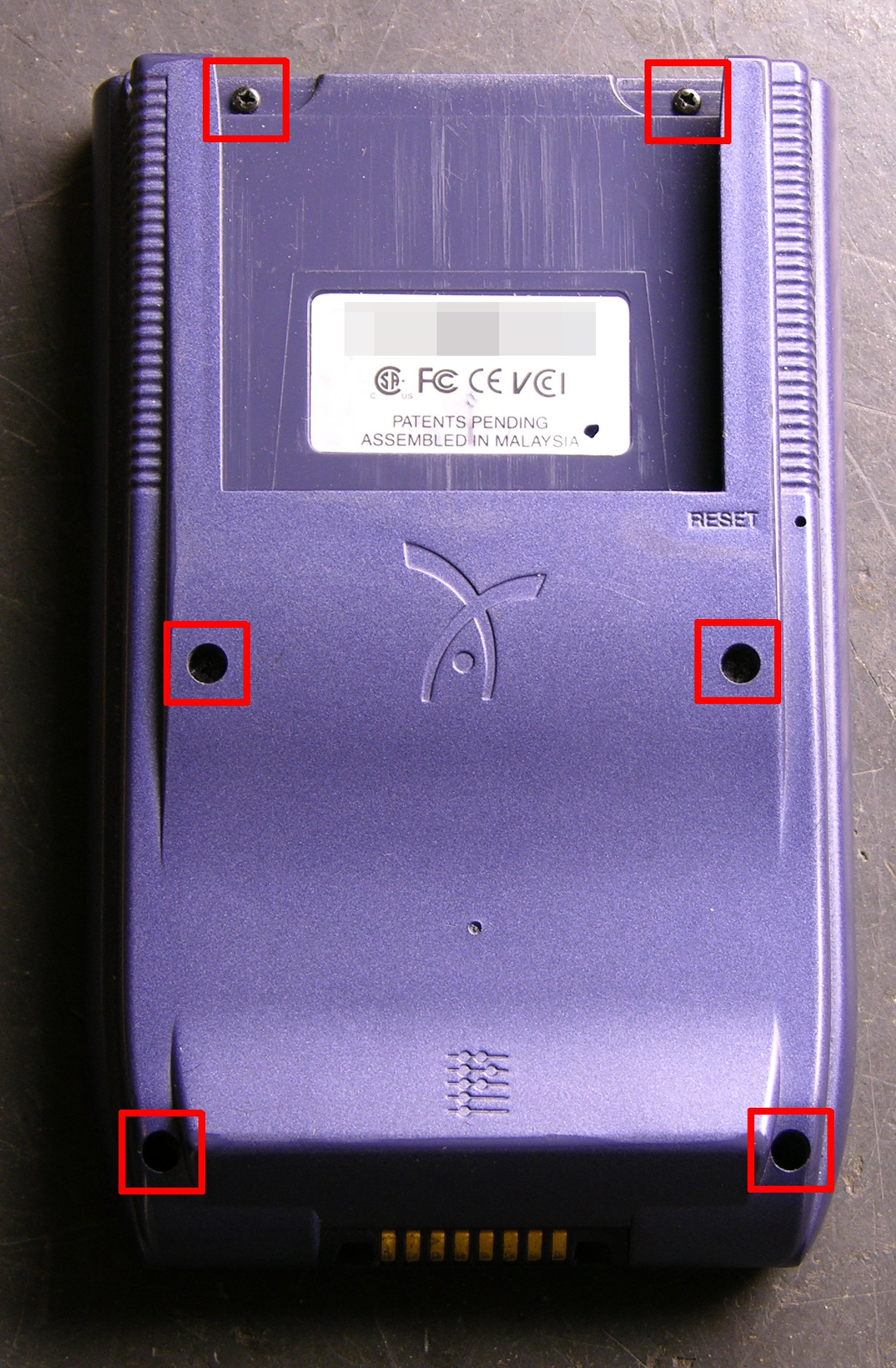
Then gently pry apart the sides with a thumbnail. With the screen facing down, fold the Visor open on the right, with the speaker and battery leads trailing across.
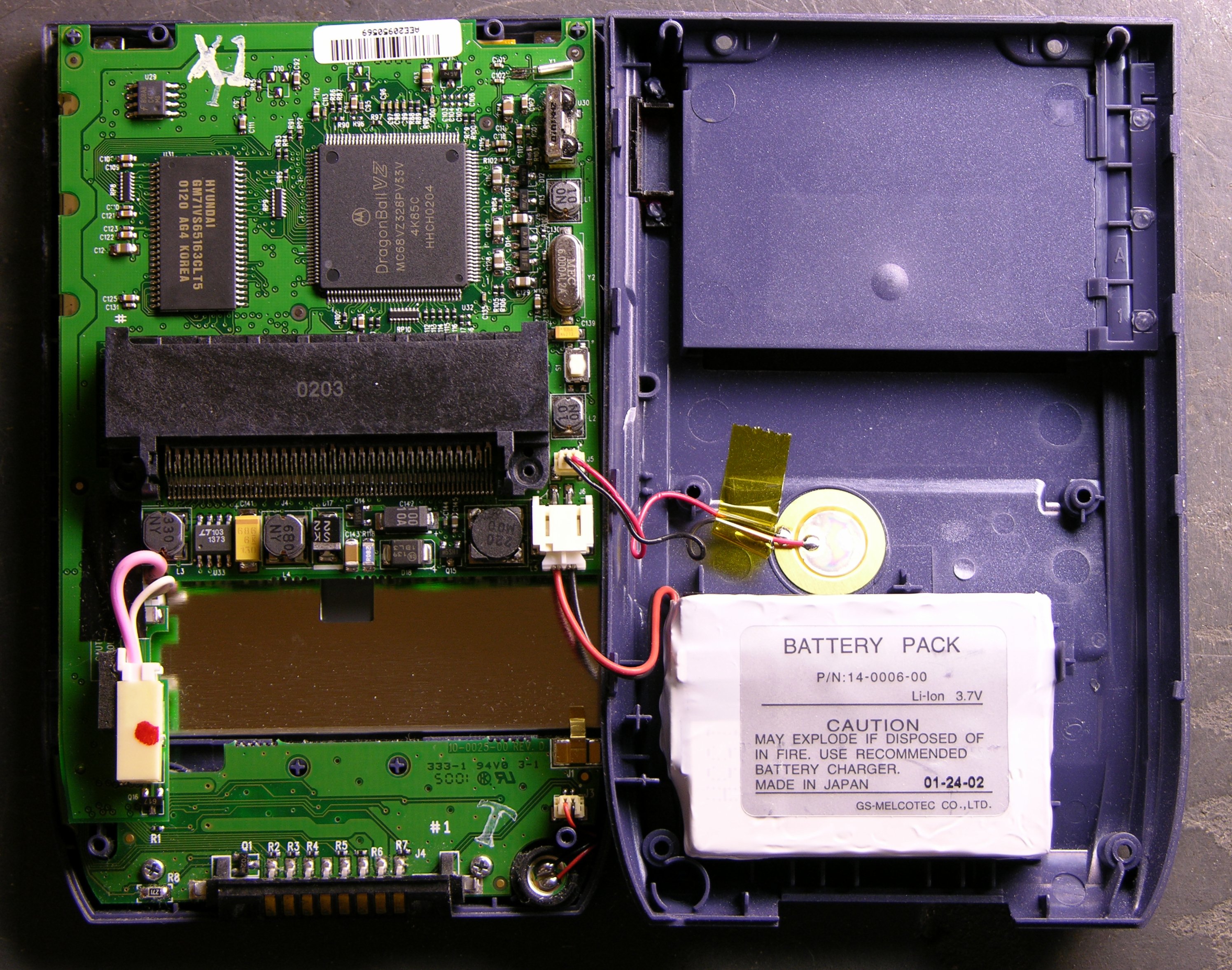
The battery is fastened to the back cover with double-stick foam; so pry it loose, then disconnect the plug.
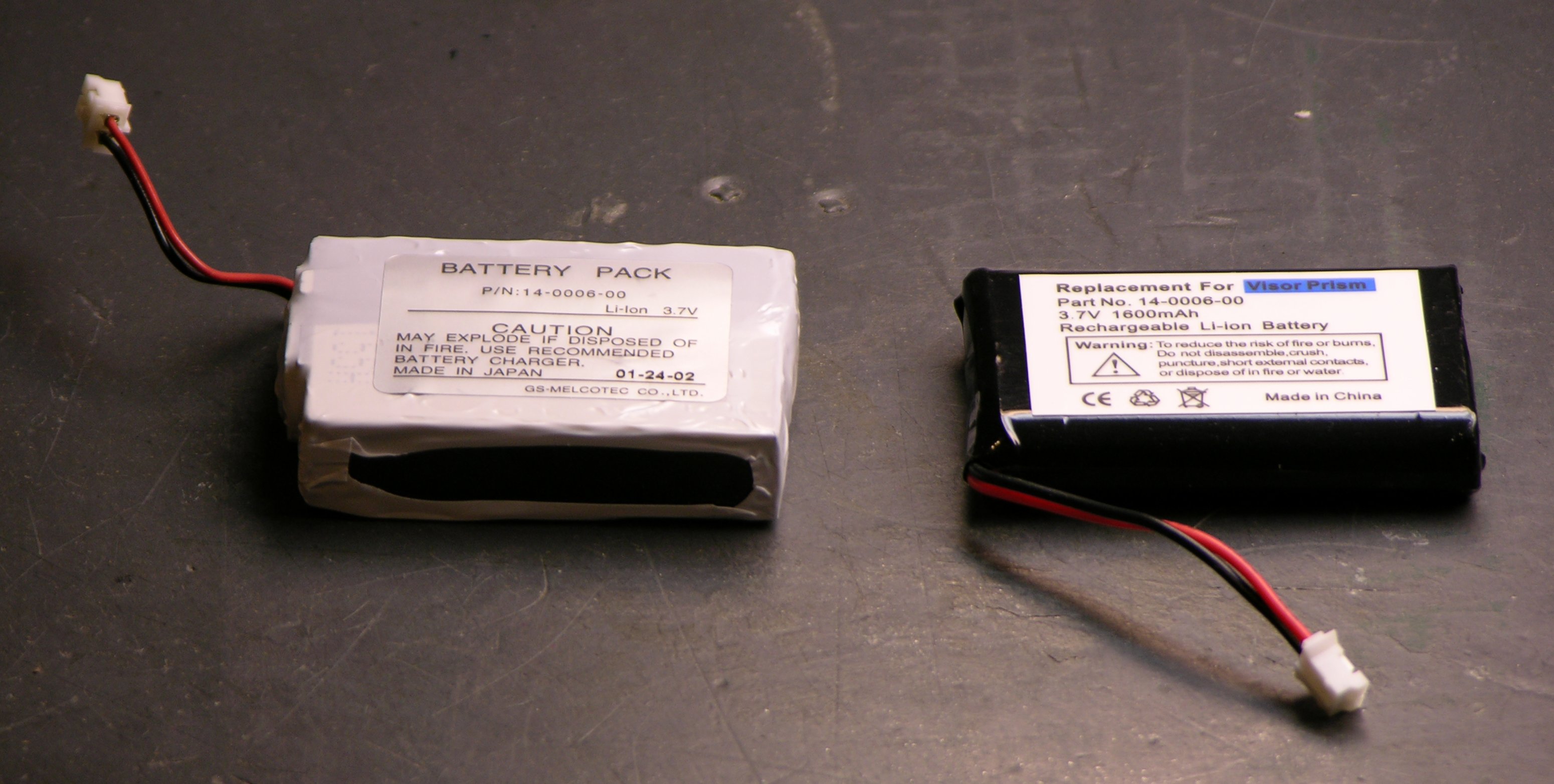
The replacement battery is smaller than the original, but at 1600 mAh, I believe higher capacity. The original battery is also now stuck to my desk with double-stick foam. Errrrr.
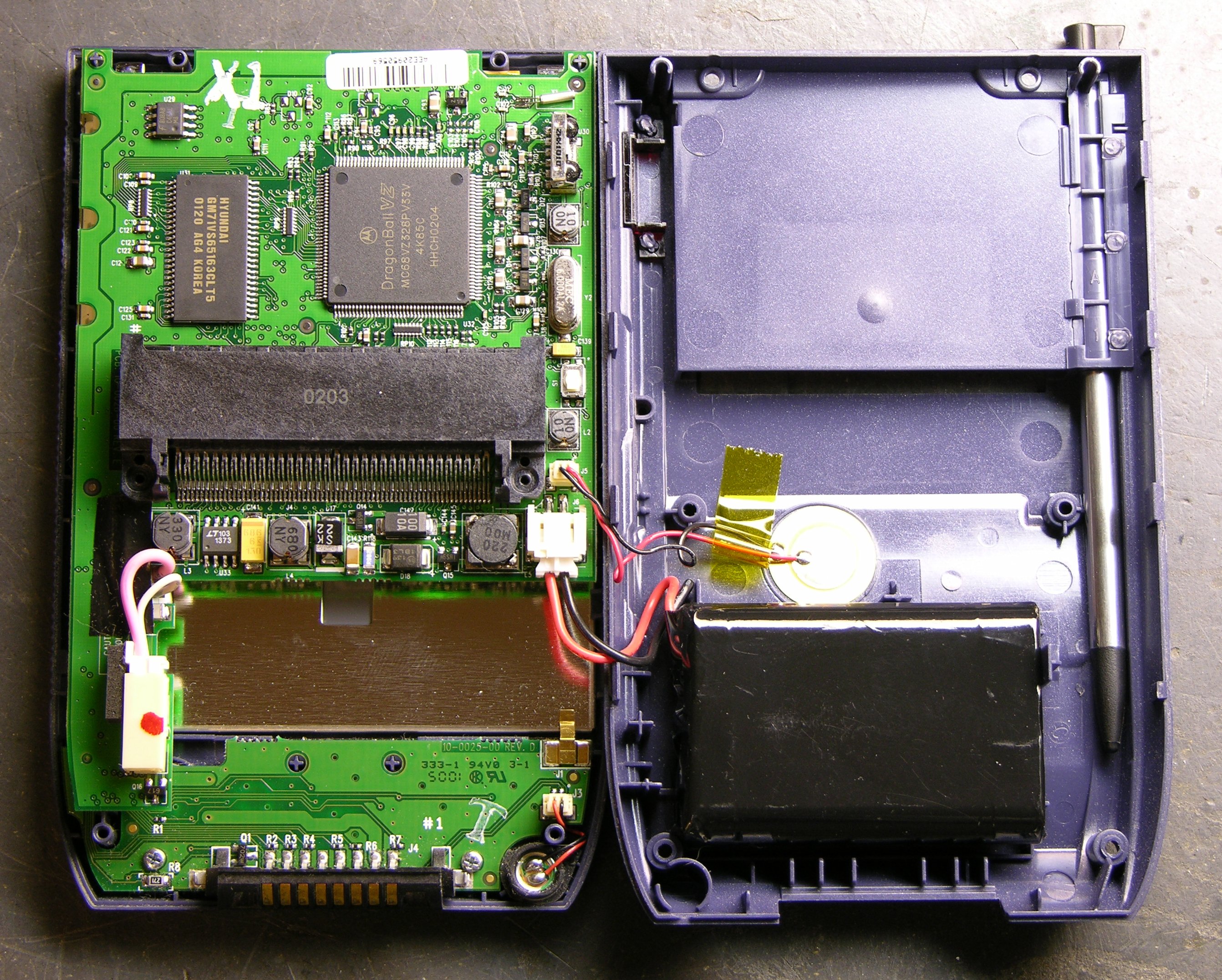
Being only slightly smaller, the replacement really doesn’t have a lot of room to move, so a small bit of foam that stayed behind is plenty to hold it in place.
There’s a small ridge of blue plastic just above the upper left corner of the battery. I had to poke the wires so they went to the left of it before I could close the case, after which reassembly was quite easy.
All Data Lost (As Expected)
The original Visor and Visor Deluxe had small batteries inside to retain memory while you were replacing their AAA cells. The Prism, having an internal rechargeable battery, apparently does not have a memory retention battery. After the replacement, it came up in touchscreen calibration mode, with date and other preferences unset and all my programs and data gone.
No matter; I’ll resync at work tomorrow. It’s a good opportunity to make sure I’ve backed up my few third-party programs correctly. (I use FileZ to twiddle the backup bits on various softwares, hopefully to make my backup strategy smarter than the default, but one never knows until one tries.)
And I’m looking forward to checking the new battery life.
Update: All applications and data restored as expected.
Your instructions were particularly helpful in providing instructions for replacing the Prism’s battery. Thanks for posting those.
Not a bad time to own a Visor; although dated, the Springboard modules are getting very inexpensive. I just picked up a new GPS Springboard module for $10. Much less that the original price of $199.00
Regards,
Jim
when I replace the battery in my color handspring visor prism and lose all the original data (like setting up the touch screen and time and all the other things that originally came on it how do I get them back? It seems like it would be a waste to just replace the battery and be able to do nothing with it,,,,,,,,,,,,anyway, I want to try…any advice? 2/12/2011 Thank you, Judie Chesson
Judie, if you only use the built-in applications, this is as simple as syncing to a PC, replacing the battery, and syncing again. When you first sync the rebuilt Visor, it’ll ask which Palm Desktop username is the same as this Visor and then restore all your data. You will still have to set the touch screen and date/time by hand, but you’ll get everything else automatically.
If you’ve added applications, they may not be backed up to the desktop. There’s a piece of software that allows you to change the backup flag on other applications and data — I think it’s called FileZ, but it’s been a long time since I used my Visor and I don’t remember for sure. If you do have additional apps and you want them backed up, look for FileZ, read its manual and set some backup bits, and then sync to the PC and check that you got your additional apps backed up before you do the battery swap.
Thanks Keith. I’m finally getting around to replacing my battery as well. I saw a few sources on Amazon and Ebay that still offer replacement battery packs. Having both a Visor Deluxe and a Prism, I have an orginal HandyGPS as well as the HandyGPS Pro. The “Pro” uses a “welded” plastic slide-on battery and it’s toast now. Also “toast” are the slide-on packs for my Visorphones. Yes I had a bunch of the “springboard modules” including the Minstrel CDPD gizmo. Does anyone know of sources for these other battery packs or ways to refurbish them? Fred in Michigan
Is it normal for the Prism screen to flicker slightly from time to time? I just got one of these and wonder if something is wrong.
This is not the problem addressed by ContrastAdjust.prc, which does not see to affect the occasional screen flicker.
Also, can a larger battery fit? What are the dimensions of the replacement battery? (Often people just solder on the connector to the wires and then ask DOUBLE the price of a generic lipo.)
Mike, sorry, it’s been so long since I used my Prism that I don’t remember! But I’d guess no.
Well, a generic ~2000mah 10 x 34 x 50 mm lipo will fit in the Prism. (I say ~2000mah because I’m skeptical of just about all lipo capacities reported by manufacturers. These batteries are probably cranked out by the millions with little to no Q/C from Chinese sweatshops.)
I just hack off the connector from the original and solder it onto the wires of the new battery, matching red and black. Battery life seems about the same as the original lipo, which is not so great. I like the old palm III and m505, which could go almost a month, better than these tamagotchis that always need charging.
I refurbished 3 “broken” Prisms and they all have this irritating screen flicker. It’s a shame…so many cool features (65K colors, expansion modules) and yet I can’t stand to look at the screen! Alas, Palm IIIc was better. (btw, 103450 lipo also fits in Palm IIIc so there is no reason to buy 20-year-old batteries for either PDA.)