Keith, why do you need so many synthesizers?
Well, they do different things.
I do have some synthesizers that only have built-in sounds; but the ones that speak to me the most are the ones where you build the sounds yourself. I’ve been thinking about a particular sound and how it would be made differently (and to different degrees of success) on different synthesizers and thought I’d demo that process on a representative sample of each underlying architecture.
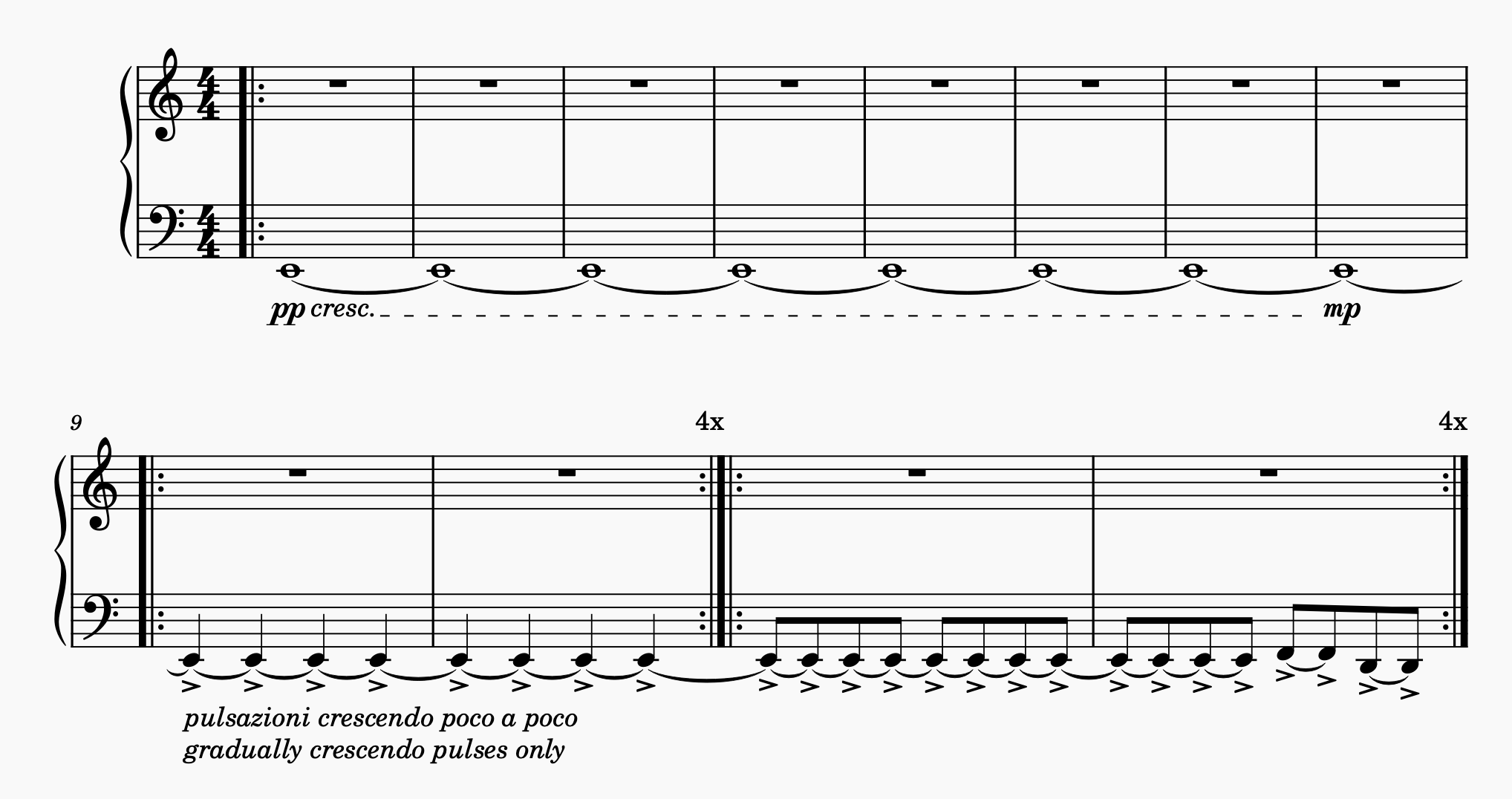
Traditional musical notation doesn’t have a clear way to capture exactly what I have in mind, so let me walk you through it: A low E is gradually faded in; then imperceptibly at first it starts getting pulses on the quarter notes, with the underlying sound held constant between the pulses as only the pulses grow louder; then the pulses speed up to eighth notes and the pitch starts changing in a repeating pattern. The measure and repeat counts are arbitrary and selected here mainly to have room to write the notations.
Further and not notated, I want the held note to be a fairly dull sound and I want the pulses to be “w-w-w” and eventually “wuh-wuh-wuh” sounds — not sharp; also dull.
What’s going to be difficult about programming synthesizers to do this is increasing the dynamic (amplitude) of only the pulses while holding the drone at a constant amplitude. Only one that I have lined up can actually do it natively and I believe only other other can do it with coaxing.
MuseScore
As a side note for the curious, that score clip is engraved using MuseScore, the zero-cost open-source music notation software. I have a fair amount of sheet music I notated years ago in commercial music notation software that went out of business and now I can’t open it and I didn’t have the foresight to export to PDF; so where I’m lucky, I still have a hardcopy I can find and where I’m unlucky, it’s locked away and I don’t expect to be able to get it back.
From time to time I’d look for an open-source replacement and kept finding MuseScore but never did anything with that information until earlier this year, when I needed to do more music notation, installed it, and love it. It’s fairly easy to use; it does gorgeous typesetting; and it gives you control over every tiny little detail of the typesetting.
If you’re looking to try it, I highly recommend keeping it open in one window and Gemini open in another. When you want to do something, just ask Gemini how. It’s infinitely patient and often correct. Very good for instructions on basic operations; nearly useless for deep menu diving for fine-tuning typesetting.