The first synthesizer for my pulse sound programming demo is my Behringer Odyssey, an analog-circuit-faithful replica of the legendary ARP Odyssey, which was first manufactured in 1972.
Features:
- Monophonic — plays only one note at a time — or paraphonic (can split the two oscillators to separate notes)
- Monaural — one-channel audio output
- 2 voltage-controlled oscillators (VCOs) — PWM or sawtooth — pitch is controlled by voltage and is … variable
- 1 low-frequency oscillator (LFO) — square or sine — that can modulate pitch, PWM, VCF, and amplitude
- 2 envelope generators — AR and ADSR — that can modulate pitch, PWM, VCF, and amplitude
- On the Behringer replica, velocity-sensing keys but no incorporation of the velocity in the Odyssey’s audio; for MIDI transmission only
- Numerous other features that I won’t use and one that I’ll describe when I do
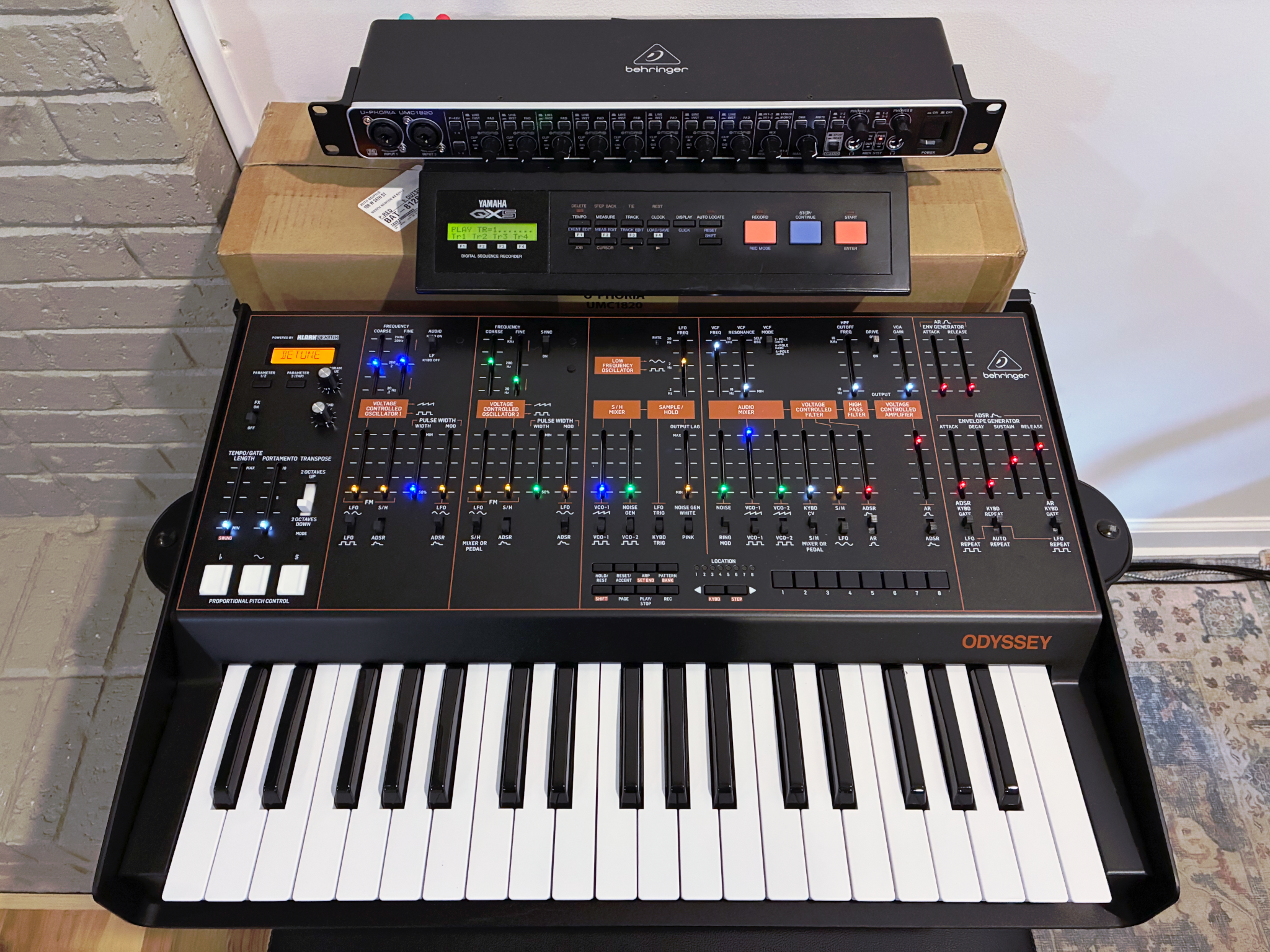
Let’s get programming.
Make it Make Sound
There are some controls that will make the Odyssey mystifyingly not make any sound. First off, set those to make sound:
- VCF Frequency to maximum (otherwise you’re low-pass filtering with a very low cutoff)
- HPF Cutoff Frequency to minimum (otherwise you’re high-pass filtering with a very high cutoff)
- Voltage Controlled Amplifier fairly high (because that’s the master gain)
- Not necessary for making sound, but start with [Over]Drive switched off
- The switches at the bottom of the ADSR section to Keyboard Gate (up), Keyboard Repeat (up), and AR Keyboard Gate (up).
Oscillators
In the Audio Mixer section, set the VCO1 level to maximum and (for now) VCOC2 level to minimum. I want a fairly dull sound, so below the VCO1 fader, set the waveform to square.
I’m making a low sound, so on the left, set the Transpose switch to 2 octaves down.
Set the VCA envelope switch to ADSR. Set the attack and decay faders halfway between the lowest two marks, sustain to the midpoint, and release a little above the midpoint.
Pressing a key should now play a note. If you’re using headphones, plug them in and carefully dial up the headphone volume. If you’re using a mixer, press a key and dial up the input trim until you’re peaking a little below 0 dB, or dial up until input clipping lights and back down until it doesn’t.
Now tune the synthesizer! The Odyssey doesn’t do “A makes 440 Hz” — it does “A makes some voltage that makes some pitch.” It’s up to you to tune it so that the keys match the tuning system your other instruments are in.
Pick something that generates a reference pitch (I use an online pitch generator and 440 Hz) and hold the key that generates what should be that pitch. Center the VCO1 coarse and fine frequency faders, then adjust the coarse until the Odyssey matches the reference pitch as closely as possible and fine-tune with the fine fader if necessary.
Finally (for VCO1 initial configuration), set all of the VCO1 lower faders to minimum. Here’s the resulting audio of the base configuration of VCO1:
I don’t have an audio player set up in WordPress, so you’ll need to click that link and may want to open it in a new tab.
Not very inspiring yet! Let’s add the other oscillator. In the Audio Mixer, set the VCO2 level all the way up and also set VCO2 to the square wave. In the VCO2 Frequency section, use the coarse and fine knobs to tune VCO2 to the same pitch as VCO1 … and then slightly detune them. The overall output amplitude has increased, so back down the VCA fader or your input trim until you’re not clipping again.
VCO2 sample — Much more interesting already with two oscillators detuned, even apart from my playing faster. 
It would be common at this point to add LFO to the oscillator frequency (pitch) for vibrato; but the rich sound of the detuned oscillators is already enough sense of “movement” for the effect I’m building, so I’ll stop there.
Filtering
The sound right now is pretty brassy or twangy and I want a dull sound. That’s changed by lowering the cutoff frequency of the low-pass VCF, which we set at maximum to get started.
VCF sample 1 — Bringing the cutoff frequency down to the 75% mark is quite dull or distant.
VCF sample 2 — Opening the cutoff frequency back up a little above the 3rd mark to about 80% of the fader range puts a little more life back into it without being as brassy as it was originally.
It would be common at this point to add envelope to the VCF to make each note sound brighter on the initial pulse — and even resonance to make each note chirp when played — but I’m going for a dull sound and I don’t want a brighter initial attack.
Envelope
“Envelope” is the term for how the amplitude (loudness) of the sound varies over the course of one note and it’s built here using
- Attack — how quickly the sound hits its maximum volume
- Decay — how quickly the sound fades back from its maximum volume while the note is still being held
- Sustain — how far the sound fades back while the note is still being held
- Release — how quickly the sound dies off once the note is released
Not only do these change the qualitative experience of the sound — a very sharp percussive sound like a plucked string or piano hammer versus a softer start like legato strings — but they can even impact the ability to perform a musical section at all, if the attack and decay are slower than the pulse of the music. Which in my case, I think they are, for the eighth notes at the end. That is to say, I think the attach-decay cycle takes longer than my eighth notes.
Adjusting the attack and decay to the right speed is … interesting … because this synth (and at least one other) moves to the release from the current amplitude if the attack and decay haven’t finished yet.
The attack always goes to full amplitude and then the note would normally decay to the lower sustain level. When releasing a key, you then expect to hear it die off from that lower sustain level. But on this synth, if you release a key before the attack-decay cycle finishes, the note dies off from however loud it happened to be in the attack-decay cycle.
This has the counterintuitive effect that holding each key ensures that it’s quiet and releasing it quickly makes it loud! This in turn requires an organist’s degree of keyboard discipline (that I don’t quite have) rather than merely a pianist’s (that I barely have after so long away).
Early key release sample — The first time through, holding each key long enough to get through the attack-decay; the second time through, playing each note staccato and therefore starting each release from a higher starting amplitude than the sustain level, which makes the release quite loud.
It’s not common in my experience to have a synthesizer’s attack and decay set slow for a fast pulse, so this is rarely an issue. But because I want the pulses to be slow “wuh” sounds even on the eighth notes, I have to use a slower-than-typical attack and decay and therefore I have to be careful with my keyboard articulation.
With that discovery out of the way, now adjust the attack and decay to where I need them for my sound:
Adjusting attack and decay sample — Tempo dictated by the full attack-decay cycle, shortening until I can play eighth-note pulses.
Crescendo the Pulses Only
The reason for this entire series is that I want to fade in a long note and then have pulses barely audible above that note with the pulses increasing in volume until they dominate and break to eighth notes. But I’ve already said that the attack always goes to full amplitude; and the attack-decay is what makes the pulses; so how can we make the amplitude of the pulses slowly increase?
Here’s where the Odyssey’s (exceedingly rare for a fixed-architecture [non-modular] synthesizer) VCA Gain comes to the rescue. In spite of its name that suggests it might be a gain multiplier, it’s a VCA bias or minimum. It sets a minimum level for the VCA, whereas the VCA (master) control is a multiplier for what the envelope is doing that is (as far as I can tell) superimposed over (not added to) the VCA Gain.
The VCA Gain, by the way, makes the Odyssey hold the last-played note forever. So …
There’s the whole deal:
- Make sure the last note I played was the low E.
- Set VCA and VCA Gain to minimum.
- Set Sustain to a minimum so the sustain level doesn’t add to the VCA Gain drone level.
- Start recording.
- Fade up the VCA Gain to a mp level.
- Start playing quarter-note pulses on the E, completely inaudible.
- Fade up the VCA. The attack-decay peaks start being audible above the drone level of the VCA Gain. Continue fading up until they’re distinctly audible.
- Switch to the eighth-note pattern, clearly audible above the drone.
- Stop on an E.
- Fade the VCA Gain back out.
All performed in the synth (no post-processing) with only two hands — one on the keyboard, one moving VCA Gain and then VCA.
I think for a refinement, I might try to pre-position the VCA at the point that the pulses are barely audible so that those of us who feel 4/4 in our heads are aligned correctly with the measures all along instead of not being sure where the count is when the pulses start. (This could also be handled by making the first pulse of each measure louder; but without velocity-responsive sound generation, that would require considerably more finesse on the VCA fader.) Also the VCA does increase the amplitude of the drone during part of the range of its movement — a weird interaction that creates an imperfect result, since I said I wanted the level under the pulses to stay the same throughout.
You’ll be thinking of other ways to get close to or accomplish the same effect … and I’ll get to those methods when I get to other synthesizers. My goal is not to demonstrate every method that each synthesizer could use, but the best or easiest method that makes a given synthesizer shine (or unshine) at a given task.